
Verify Responses - Overview
This guide explains what Verify Responses is, how it works, and how it helps you fact-check AI answers and assess compliance risks.
What is Verify Responses?
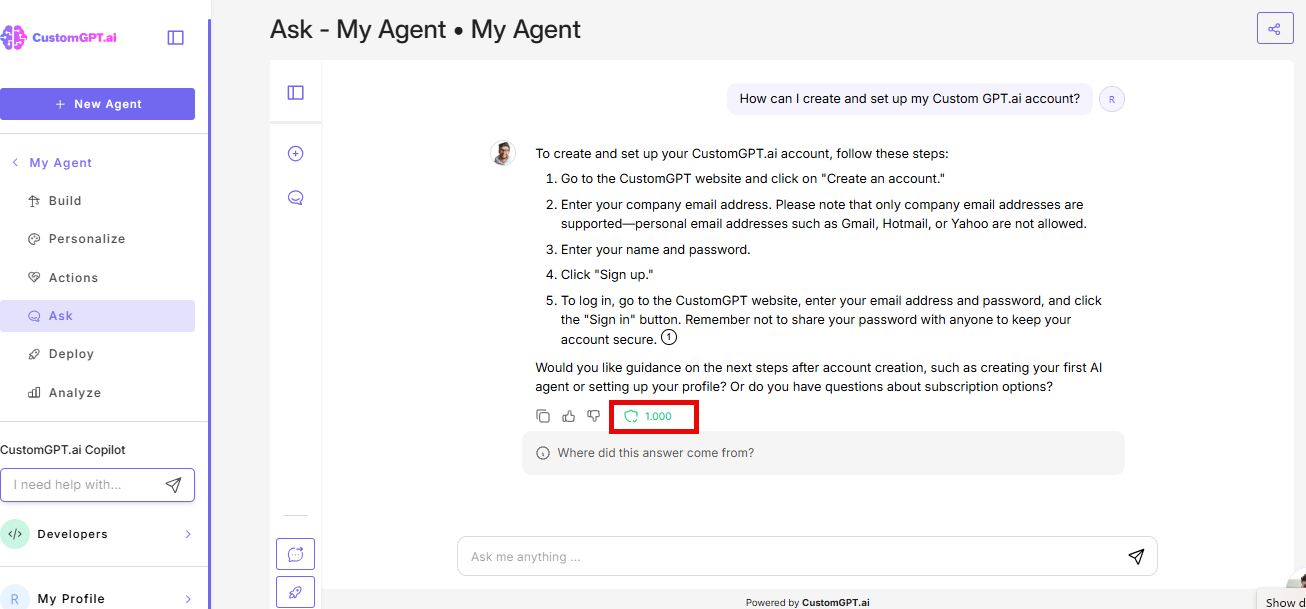
Verify Responses is an advanced feature that analyses your AI agent's answers for factual accuracy and compliance risks. It extracts claims from the response, checks them against your source documents, and evaluates the answer from multiple stakeholder perspectives.
In simple terms: Click the shield icon after any AI response, and get a full breakdown of what's accurate, where it came from, and whether it's safe to use.
Verify Responses works across all deployment types, including API queries.
Why use Verify Responses?
Users don't trust AI if they don't know how it works. Verify Responses helps you:
- Confirm facts before sharing AI answers with customers or stakeholders
- Trace every claim back to its source document
- Identify gaps in your knowledge base
- Get the audit trail your compliance team needs
- See verified claims for each response at a glance
- Find low-scoring conversations in Customer Intelligence and fix the root cause- whether it's your persona, retrieval, or knowledge base.
Key components
Accuracy
Extracts every factual claim from the AI response and checks it against your source documents.
For each claim, you see:
- The exact text from the source that supports (or contradicts) the claim
- File name, page number, url
- Verification status: verified or unverified
- Verified claims score
Note: Verified claims scores are AI-generated and work best as a guide. Use low scores as a starting point to review your persona, docs, or settings. See our best practices guide to get the most out of this feature.
Trust Building
Evaluates the response from six different stakeholder perspectives:
- End user
- Security IT
- Risk compliance
- Legal compliance
- Public relations
- Executive leadership
Each stakeholder provides a rationale, and specific recommendations.
How it works
- Your agent generates a response as usual.
- Click the shield icon next to the response.
- Accuracy extracts and checks all factual claims.
- The Trust Building evaluates the response from all 6 stakeholder perspectives.
- Review the results in the Verify Responses panel.
- View verified claims scores for each verified claim.
- Track low-scoring conversations in Customer Intelligence and fix the root cause.
Important: The analysis runs after the response is generated. Your normal chat speed is not affected.
Who sees this?
Verify Responses is a builder-only tool. Your end users will not see the shield icon or the analysis panel. They continue to have a clean, standard chat experience.
The feature is designed for the builder and administrator to test, audit, and prove that your agent works correctly before and after deployment.
Availability
Verify Responses is available on all plans.
You can use Verify Responses in two ways:
On-demand: Click the shield icon on specific responses when you need a deeper look. Use this for spot-checking or verifying sensitive answers.
Always-on: Enable the feature in your agent settings and it will automatically run on all responses. Use this for continuous monitoring and audit trail generation.
Verify Responses is an Agentic Action and uses additional query credits when enabled. See Actions cost for pricing details.
Related articles
- Enable Verify Responses
- Understanding your Verify Responses results
- Verify Responses use cases
- Verify Responses- Best practices
- Track Verify Responses usage
- Actions cost
- Export Customer Intelligence Data
Updated 8 months ago