
Query consumption for high-performance models
Overview
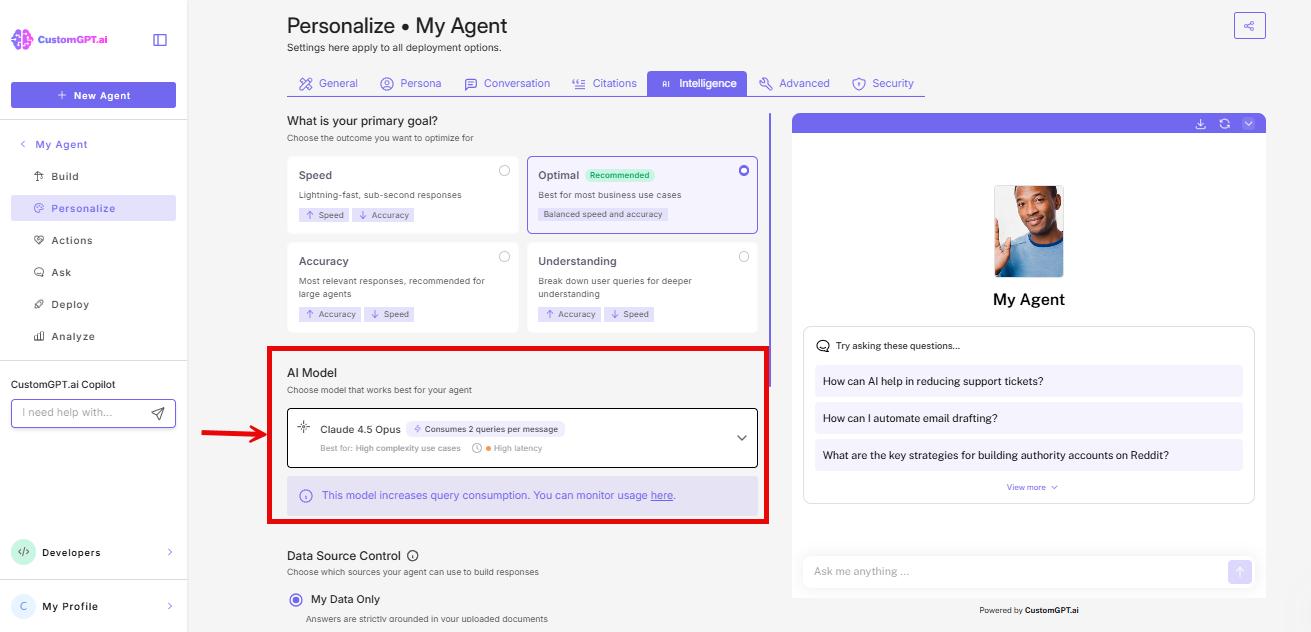
Some models in the Intelligence tab consume more than one query per message. This is indicated directly in the model dropdown when you select one of these models.
This article explains what that means, how it affects your query usage, and how to monitor consumption.
Which models are affected
Currently, Claude Sonnet 4.6 Reasoning, Claude Opus 4.5, Claude Opus 4.6, and Gemini 3.1 consume 2 queries per message.
Model Queries per Message Standard models (e.g., GPT-4.1, Claude Sonnet) 1 Claude Opus 5.5 3 Claude Opus 5 3 Claude Sonnet 5 Reasoning 2 GPT-5.6 Sol 2 Gemini 3.1 Pro 2
Note: The model selection dropdown is available to Enterprise plan users only.
How this affects your usage
Every message processed by your agent- including messages from end users interacting with your deployed agent- counts against your query balance at the rate shown for the selected model.
For example, if your agent receives 100 messages while Claude Opus 5 and Claude Sonnet 5 Reasoning are selected, 200 queries will be deducted from your balance.
Monitoring your query usage
You can monitor your query consumption at any time by going to your usage dashboard in account settings. This is especially important in high-traffic deployments.
Learn more about How to view limits and usage
Switching to a different model
You can change the selected model in the Intelligence tab at any time. Switching to a standard model reverts query consumption to 1 query per message.
Other high-performance models
Additional models may be added under this framework in the future. Each will display its own query multiplier in the dropdown.
Related articles
Updated 10 days ago