
Web Search cost and reporting
Cost per web search
Each web search your agent performs costs 2 additional query credits on the Premium plan and 3 additional query credits on the Standard plan, on top of the original user query.
Example:
Premium plan
- 1 query for the original question
- 2 additional queries for the web search
- Total: 3 queries consumed
Standard plan
- 1 query for the original question
- 3 additional queries for the web search
- Total: 5 queries consumed
These additional queries are deducted from your plan's included query credit allocation. There is no separate billing for web search.
On the Premium plan, the agent can perform a maximum of 3 web searches per user query. At 2 additional queries each, the maximum added cost per user question is 6 query credits.
On the Standard plan, the agent can perform a maximum of 1 web search per user query at 3 additional query credits.
Plan availability
Web Search Agentic Action is available on all plans.
How to view web search usage
Open your agent's Actions page. On the Web Search card, you will see a Web Searches count showing how many web searches the agent has performed.
Hover over the card to see a detailed breakdown:
| Metric | What it shows |
|---|---|
| Times used | Number of web searches performed |
| Extra queries per usage | 2 on the Premium plan, 3 on the Standard plan |
| Total added query credit | Times used × 2 on the Premium plan, or Times used × 3 on the Standard plan |
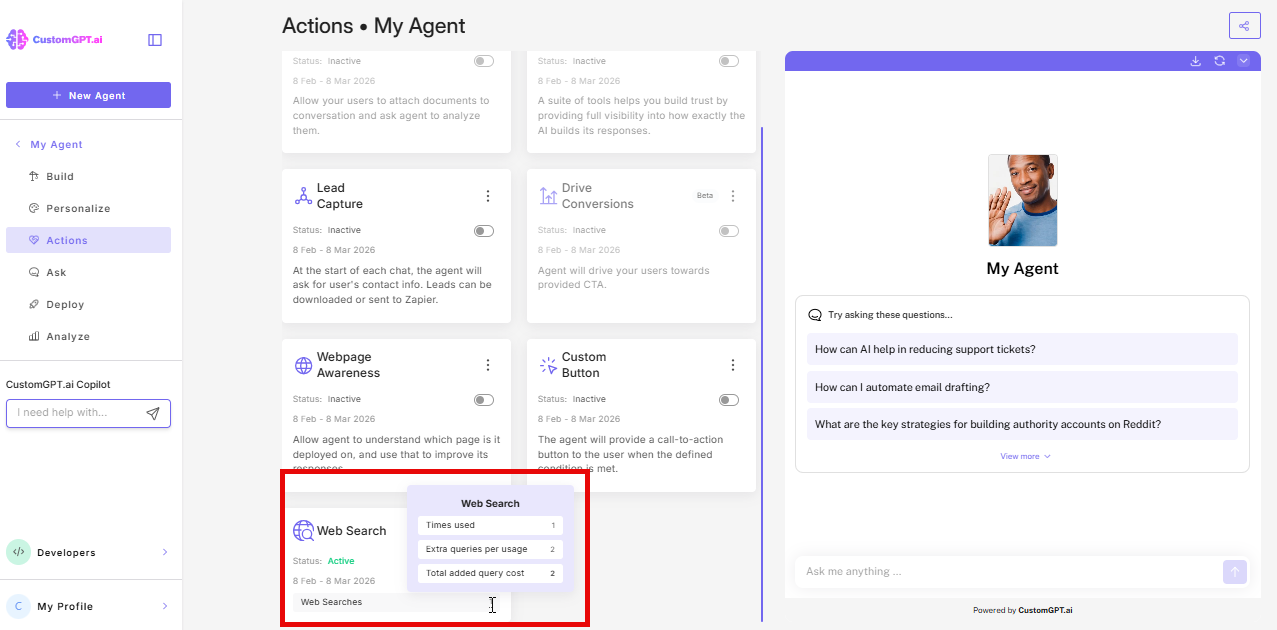
Web search usage also appears in your standard Analytics dashboard alongside all other query metrics. You can also see the total added query credit for Web Search on your Limits & Usage page, under Added query credit per usage.
Controlling costs
If you want to limit unplanned web search usage, switch the trigger mode to Only on explicit user request. This prevents the agent from searching automatically and gives you predictable usage.
To turn off web search entirely, go to the Web Search card on your Actions page and switch the toggle off.
Related articles
Updated 4 months ago